Topics Covered
Chapters Covered:
- 5, 7, 8
- Performance, Memory, Caches, Memory Management
- All other knowledge implied: Machine Design, Digital/Sequential design too
Topics:
Processor design
1 bus vs 2 bus vs 3 bus designs
- 1-bus: All data transfer over 1 bus
- 2-bus: one for data, another for address
- 3-bus: one for data, address, and control. Fast, but complex
Tri-state devices, what they are and why they are necessary
- Allow lines to be disconnected from the bus, allow for values to remain stable and specific (otherwise, held values/flip flops would interrupt)
- Why? Prevents conflicts when multiple devices use the same bus.
What the control signals do
- Tell components what to do. PCin, PCout, Read/Write, Load, etc.
Why control signals need to be asserted carefully
- Is there to this? - Incorrect assertions leads to incorrect execution
Why you cannot connect outputs together
- The same reason you need tri-state, they would mix and overwrite each other.
- If two devices drive different values, they clash and cause errors (short circuit).
- Solution? Tri-state buffers.
How to evaluate a diagram of a machine
- Look for how buses connect to ALU, memory, registers
- Look at control signals, and how they affect data flow
How to make a machine perform functions like Fetch, Execute, etc.
- How to actually do this?
- Cycle:
- Fetch
- Decode
- Execute
- Store
- Repeat
How CPU control logic can be represented as a State Transition Diagram
- It can be represented as moving through the FDE cycle in a state transition diagram. Moving through the same fetch and decode cycles, then branching out to execute, then coming back to the same fetch state to repeat.
Processor performance
Defining performance
1. Throughput - Total instructions executed per second
2. Latency - Time taken for one instruction
Measuring performance
What a benchmark program is, what it is used for, etc.
- It’s used to simulate a workload to measure CPU performance
Reporting performance
MIPS vs FLOPS vs Elapsed time
- MIPS (Millions of Instructions Per Second): Can be misleading, different instructions have different kinds.
- FLOPS (Floating Point Operations Per Second): A more representative metric. Especially valuable for scientific computing.
- Elapsed Time: Real world performance, the literal time
Improving performance
CPU time equation
- CPU_time = CPI x Instructions x Cycle Time
-
Basics of Amdahl’s law
- “the overall performance improvement gained by optimizing a single part of a system is limited by the fraction of time that the improved part is actually used”
- Optimize the things that are used a lot
The heat problem in modern processors
- Find More: Modern CPUs generate heat due to high frequency & power usage.
-
Basics of Memory
Static memory cells (what they are, how they work, etc.)
- SRAM: Uses flip flops to store bits
- Faster (no need to refresh?), but expensive
Dynamic memory cells (what they are, how they work, etc.)
- DRAM: Uses capacitors to store bits
- Slower, but denser and cheaper
- “Needs a periodic refresh?”
Basics of Caching
What the memory hierarchy is
- Registers → L1 → L2 → L3 → RAM → Disk.
- Closer = faster, but smaller.
What locality is, the kinds of locality, and why it matters
- Temporal Locality: Recently accessed data is likely to be reused / reaccessed
- Spatial Locality: Nearby memory locations are likely to be reused / reaccessed
The goal of caching
- Store frequently used data closer to the CPU to speed up access
How a cache works in detail
FA, SA, DM, replacement strategies, write policies, line sizes,
etc.
- FA: Fully associative. Blocks can go anywhere
- SA: Set associative. Blocks can go in a few places
- DM: Direct mapped. Each memory block maps to one cache locations
- Replacement: LRU (least recently used), FIFO, etc.
- Write Policies: Write back vs. write-through
Average Memory Access Time equation
- AMAT=Hit Time+(Miss Rate×Miss Penalty)
Basics of Virtual Memory
What virtual memory is
- Provides illusion of large memory using disk storage.
Why it is necessary
- Allows programs more memory than physically available
- Memory protection between processes
What program characteristic VM exploits in order to work
- Locality: Only small portions of a program used at a time
How VM works in detail
Frames, pages, Page Tables, etc.
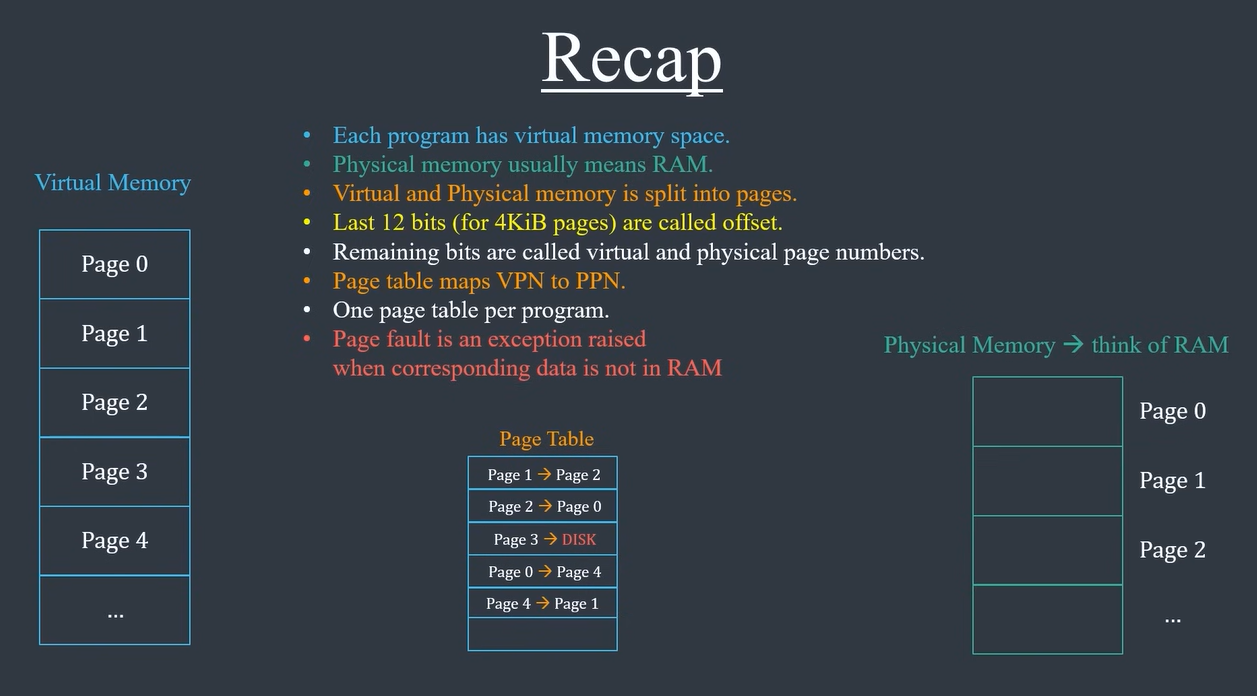
- Memory is divided into pages (logical units)
- Pages are mapped to frames (physical memory)
- Page Table: Maps virtual addresses to physical addresses
What a TLB is, why it is necessary
- Translation Lookaside Buffer caches recent address translations.
- Speeds up access, avoids page table lookups
What a page table walk is, why it is necessary
- Happens when TLB misses
- CPU searches page table for correct frame
Virtual Memory
- Has some good visualizations!
Virtual Addresses
Physical Addresses
Memory: RAM, around 4 GB in past. Could also access other forms of memory, like other devices.
Problems with physical addresses:
- Not enough memory -> crash if not enough RAM
- Memory Fragmentation -> Run out of space
- Security -> Corrupt other program’s data
They could be solved by giving each program its own memory space (virtual memory)
- However, it has to be mapped back to real memory in RAM (physical memory)
Swap Memory: additional memory, memory not in RAM
Page Fault: When data not available in RAM and we have to go to disk, we call that a page fault
Implementation:
CPU has to find the mapping from virtual address, to a physical address, and read that data.
If a page table has every entry in physical memory:
- a word is 32 bits
- 2^32 addresses for each byte = 2^30 words
Instead of 1 entry to 1 word, allocate blocks / pages
Use TLB to MASSIVELY speed this up. If hit, can be 1 cycle, and not have to do as many checks with tables in memory.
MMU - Memory Management Unit, usually on CPU and programmed by OS