📗 -> Lecture Date: Name
🎤 Vocab
❗ Unit and Larger Context
Small summary
✒️ -> Scratch Notes
apt - package manager
ssh - Secure SHell protocol
What can the CLI do?
Instead of using a CLI to do things for us, we interact directly with the system
Shells:
- Windows cmd prmpt
- Python
- Bash
- zsh (macos?) (Unix based, similar to bash)
Companies like Linux, so we need to learn it
Scenario:
- Working with a shared computer without a GUI
- You’re forced to interact using the CLI
- Working with limited internet resources and need to lookup documentation
- Lots of info found within bash itself
Pros
- Finer control of the OS
- Finer control over program behaviors
- No layers of GUI’s to traverse through
- FAST
- Type a lot faster than you can click
Cons
- Unintuitive
- Does not protect you from yourself
Substituting with the CLI
- Text editor or IDE
- Read or write files
- Code compilation or execution
- Find and replace
- File Explorer
- Creating files
- Organizing your project
Anything you can do with a GUI, you can do with the CLI. Oftentimes you can do more.
Introduction to Bash and the filesystem
nrose@ad3.ucdavis.edu@pc3:~$
nrose - User
ucdavis.pc3 - hos
~ - cur dir
$ - CLI ready to receive cmnds
Filesystem overview
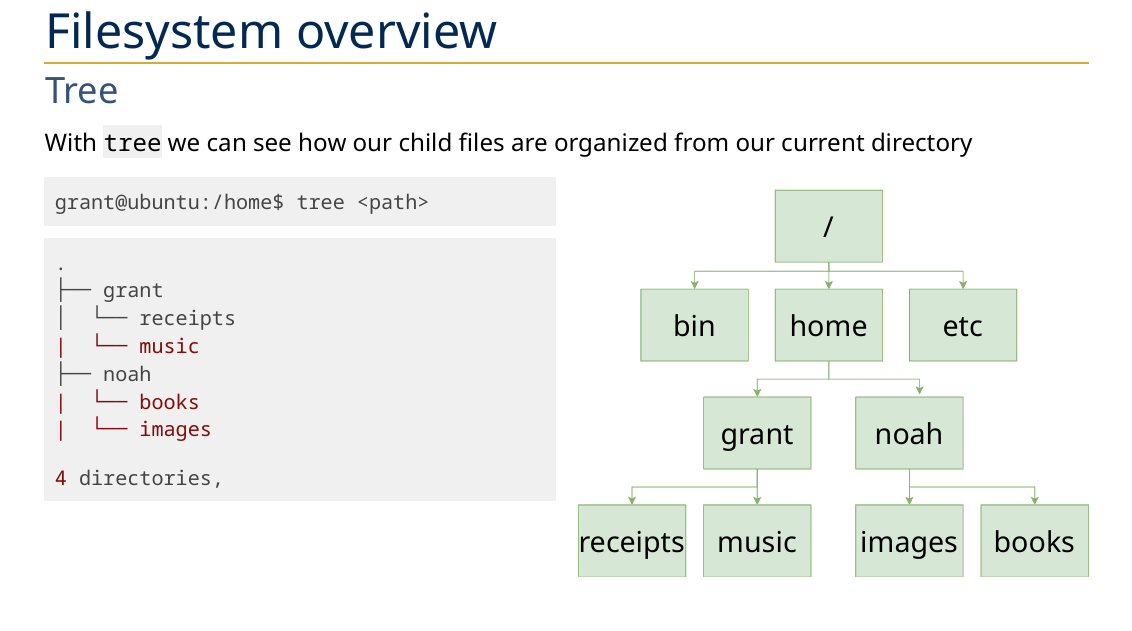
If on ~$, pwd will output /home/[username]. In this case, /home/grant
Types of filepaths:
Absolute
/home/grant/school
Relative
./school../noah
Special Entries:
./- Refers to current dir../- Refers to the dir one above the current location
Bash Basics
cd <path> - Change Directory. If no args, takes to home directory ~$ = /home/user
ls <path> - List Files. If no args, default to working dir
- Can add a
-aflag to see ALL files, including hidden files- Might use a hidden files to store preferences and configurations, that we wouldn’t want other people to easily see
- Other commands also can add flags, like
treethat can have a-aflag
-lis another common flag, and will give a detailed output, with permissions and more- Flags are combinational and order does not matter
mkdir <flags> <path(s)>- Make directory
mv <flags> <sourcePath(s)> <destinationPath>- Move files from source to destinations - Can also rename files, by moving them
mv .sec notSecret
- Can overwrite existing files
cp <flags> <sourcePath(s)> <destinationPath>- Copy files directories - Can overwrite existing files
cat <path>- Checks content - Displaying files: cat reads and displays the contents of one or more files to the terminal.
- Merging files: cat concatenates (merges) the contents of multiple files into a single output stream.
- Creating new files: cat can create new files by redirecting output to a file.
rm <flags> <filePath(s)- Remove each file permanently - Does not remove directories by default
-r- Remove directories and other content recursively-i- Prompt before every removal (y or n)
Continue with Aliases
Aliases
Can substitute an alias name for a command to be run
- Useful if things are too tedious or repetitive
alias <aliasName>='<commandToRun> - Can overwrite existing commands as well
alias rm='rm -i'- Adds the rm flag by default, making it ask for confirmation before deleting
alias rm='mv -t ~/.trash'- Doesn’t delete, but moves to trash folder
.bashrc file has shell configurations
Interacting with files:
Printing contents of a file to screen:
cat <flags> <file>- Prints file contents to console
less <flags> <file>- Interactive screen to look through
/key lets you jump through usages of a word
head <file> - First couple lines
head -n <#> <file> - First # lines
tail <file> - Last couple lines
tail -n <#> <file> - Last # lines
Text Editors
Nano and Vim are the big ones
- Nano is the simple one you used for MAT 22AL
- Vim is Vim
Finding CLI help
man <command>
- Long manual with docs
tldr <flags> <command> - Short summary, common flags, etc.
🧪-> Example
🔗 -> Related Word
- Link all related words