Operating Systems - MT2
What we have studied since the last midterm. There are 8 questions total.
- OS structure (1 question)
- Kernel abstraction (2 questions)
- Process scheduling (2 questions)
- Concurrency and threads (2 questions)
- Synchronization (1 question)
Lectures covered:
04.os-structure.pdf
05.kernel-abstraction.pdf
06.process-scheduling.pdf
07.concurrency-threads.pdf
08.sync.pdf
4 - OS Structure
Layers
Made up of multiple layers (top-bottom is user vs kernel vs hardware)
- Application - This is manual code and that stuff
- Libraries - These are precompiled objects linked to applications (in C)
- Portable OS layer - This is where things become kernel level. Implemntation of most system calls for high-level kernel code (virtual file system, IPC, process scheduler, etc.)
- Machine dependent layer - More gritty stuff. Bootstrap, system init, I/O device drivers, memory managements, etc.
- Processor (+ hardware system) : layers to interface with hardware and processors. ISA+ABI.
API (Application Programming Interface): interface between pieces of code
UAPI (User API): syscall interface between apps and kernel
HAL (hardware-abstraction layer), interface inside kernel between arch- independent code and arch-dependent code
ISA (Instruction Set Architecture): list of processor instructions
ABI (Application Binary Interface): interface between code and processor
Compilation
4 stages:
- Preprocessor (cpp) - Transform program before compilation
- Compiler (cc) - Compiles a program into assembly code
- Assembler (as) - Compiles assembly code into relocatable object file
- Linker (ld) - Links object files into an executable
Kernel
Monolithic Kernel
Entire kernel code linked together in a single large executable
Sys call interface between kernel and applications
- Linux / Unix / BSD / Windows 9x
Pros: - Great performance
Cons: - Increased potential for instability
- Crash in any function brings the whole system down, kernel panic
Microkernel
Kernel services implemented as regular user space processes
Microkernel communicates with service using message passing
- Minix / Mach / L4
Pros: - Great fault isolation
Cons: - Can be inneficient (boundary crossings?)
Hybrid kernel
Trusted OS services implemented in kernel
Non trusted OS services implemented as regular user space processes
best of both worlds?
- macOS / Windows NT
Monolithic kernel for the most part, but user-space drivers
5 - Kernel Abstraction
Processes
A program in execution, running with limited rights
Multiple benefits to protected execution of processes:
- Prevent processes from:
- crashing all other processes
- crashing the os
- hogging resources
- protection from malicious processes
PCB (process control block) Info:
- PID
- Memory segments it has access to
- Permitted files (based on user ID (uid), group ID (gid) )
Execution: Native vs Interpreted
- Interpreted
- the default in interpreted languages (JS, Python, etc.)
- Emulate each program instruction
- Execution quite slow
- Native
- Run unpriveledged code directly on CPU
- Fast!
- Safe execution needs hardware support
- Run unpriveledged code directly on CPU
Dual Mode
Distinct execution moes in hardware
- Literally a bit in the processor status register (0/1) (could be more in some archs)
Kernel Mode - Read/write to any mem location
- Access any I/O device
- Etc.
User Mode - Limited priveledges on hardware, as granted by OS
Hardware Support
Things that can be implemented in hardware:
- Priveledged instructions
- Memory protection (IE process protected from other processes)
- Timer interrupts (kernel regains control on CPU periodically)
- Mode switch (safe and efficient way to switch modes)
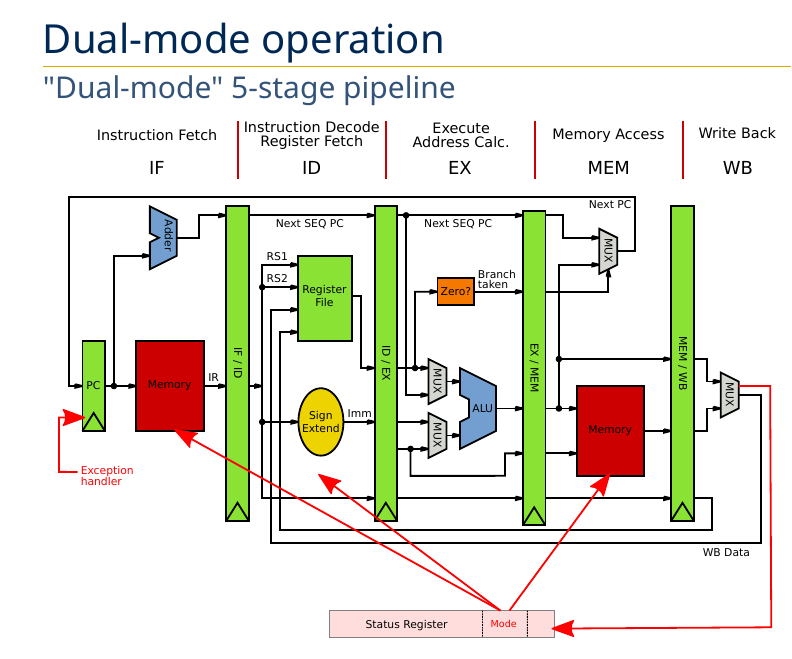
5 stage pipeline:
- Instruction Fetch (IF)
- Instruction Decode / Register Fetch (ID)
- Execute Address Calc. (EX)
- Memory Access (MEM)
- Write Back (WB)
Notice the red blocks of memory. In Dual Mode these are protected by the mode:
Examples of Priveledged Instructions, result in seg faults:
asm ("cli")- Attemtping to turn off interrupts (Clear Interrupt Flags)- Toggle processor mode
- Modify memory protection
- Flush/invalidate caches/TLBs
- Halt or reset processor
- etc.
Memory Protection
Virtual memory translates to physical memory
Physical memory is bounded:
- If
<a base or>a bound, then raise an exception
Boot Sequence
When you power on a computer:
- Privilege mode set to kernel, and PC set to address of boot code (BIOS)
- Boot code runs
- Loads kernel image into memory
- Jumps to kernel’s entry points
- Kernel code runs
- Machine setup
- Choose the first user process to run, loads it, and jumps to it
- Priveledge changed back to user mode
After the process runs, how does the kernel regain control?
- Priveledge changed back to user mode
Hardware interrupts
Processor periodically interrupted by a hardware timer
User mode to kernel mode (trapping)
- Exceptions (or faults)
- Caused by program behavior
- Sync
- Interrupts
- Triggered by I/O devices (timer etc.)
- Async
- Sys Calls
- Request from process to kernel to perform operation on its behalf
- Intentional synchronous
Kernel Mode to User mode
- Return from interrupt or sys call
- Process context switch - Resume some other process
- New process start
- Signal - Async notification if signal handler defined
Mode Swtiching
Safe and efficient switching critical:
- Protect from corrupting the kernel
- Reduce kernel overhead
Reqs: - Atomic transfer
- Trap vector
- Transparent and restartable process execution
How to switch
User -> Kernel
- Save cause for trap (Interrupt, Exception, Syscall?)
- Save current PC
- Jump to kernel’s trap vector
- Switch from user to kernel mode
- Change memory protection
- Disable interrupts
Kernel -> User
- Jump (back) to process (restore PC)
- Switch from kernel to user mode
- Change memory protection
- Restore interrupts
Kernel Data
Kernel has its own stack, located in kernel memory
- Separate from process’ stack
Kernel stack is used to save associated process context
One kernel stack per process
- Kernel saves its own state when switching between two processes
6 - Process Scheduling
Processes have:
- Address space
- Environment
- Execution flow
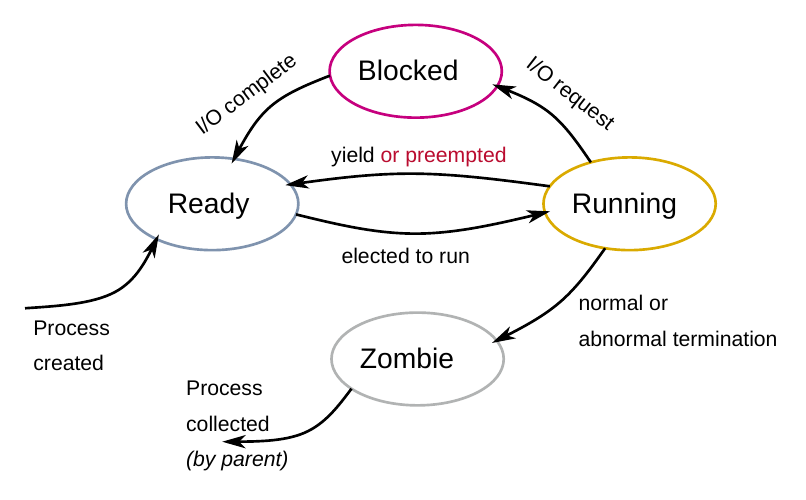
Process Lifecycle:
- Ready
- Running
- Blocked
- Zombie
Orphans?
Scheduling Vocab
Submission time: time at which a process is created
Turnaround time: total time between process submission and completion
Response time: time between process submission and first execution or first response (e.g., screen output, or input from user)
Waiting time: total time spent in the ready queue
Scheduling Algos
FCFS / FIFO
SJF
Preemptive SJF (SRTF)
RR
Multi-level Queue Scheduling
Multi-level feedback queue
7 - Concurrency and Threads
Concurrency - The composition of independently executing tasks
- Opposite of sequential execution
- Process concurrency - running complex problems as multiple distinct processes
Types of concurrency:
- CPU virtualization - Process interleaved on same CPU (‘dumb’ threading)
- I/O concurrency - I/O bursts overlapped with CPU bursts (smart threading, relinquish CPU when I/O bound)
- CPU parallelism - Code ran with multiple CPU simultaneously
Speedups:
- Usually linear, also could be sublinear (bottlenecked by resources) or superlinear (caching)
Process concurrency limitations
- Forking processes can be taxing (duplicating resources, address space, etc)
- Context switching slow (processor caches not shared between processes)
- Communication difficult between processes (via IPC only, needs syscalls)
Is it possible to run processes in same address space?
- Benefits: No duplication, and shared memory
Process concurrency vs thread concurrency
Threads
Many problems are concurrent, threads are a natural solution
Solution:
- UI App
- One thread for user responsiveness / UI
- Other thread for executing longer tasks, or blocking on I/O
- Web server
- Can interleave on disk I/O, and handle multiple requests at once instead of blocking
- Array computation
- Use one CPU for first half, another for second half
- Not possible via forking
Execution Context
Threads have:
- Exclusive use of the processor registers
- Their own stack
Metadata Structures:
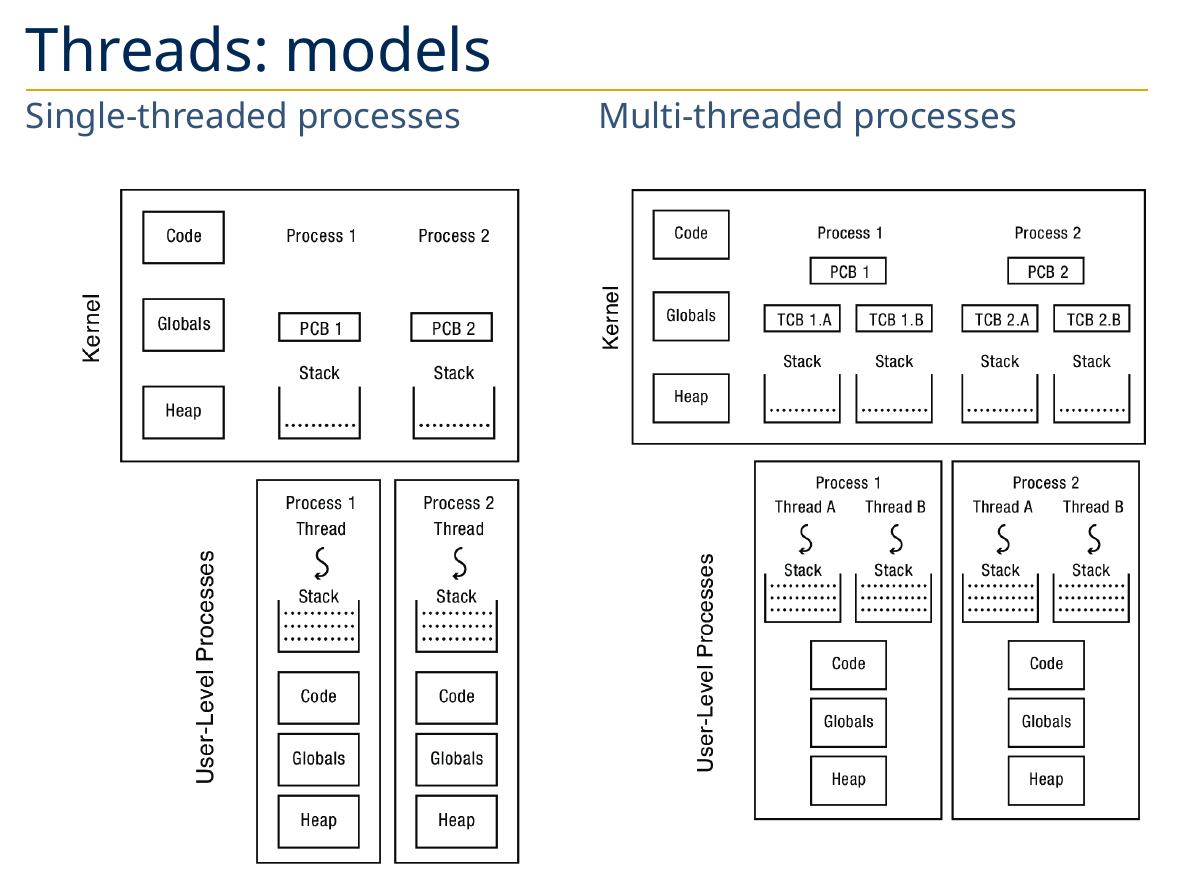
Process Control Block (PCB)
- Covered: PID, owner, priority, file descriptors, address space, cwd
- New: active thread, pointers to thread control blocks (TCBs)
Thread Control Block (TCB) - Stack pointer, PC, thread state, register values, pointer to PCB, etc.
Thread Models
API
Depends on OS/library (e.g. POSIX pthreads)
/* Thread function prototype */
typedef int (*func_t)(void *arg);

/* Create new thread and return its TID */
thread_t thread_create(func_t func, void *arg);

/* Wait for thread @tid and retrieve exit value */
int thread_join(thread_t tid, int *ret);

/* Yield to next available thread */
void thread_yield(void);

/* Exit and return exit value */
void thread_exit(int ret);
Implementation
Kernel-level threads (one-to-one)
User-level threads (many-to-one)
Kernel Threads (one-to-one)
- Threads the OS knows about
- Each process has at least one kernel-level thread (
main())
- Each process has at least one kernel-level thread (
- Kernel manages and schedules threads
- Syscalls to create/destroy/synchronize threads
clone()on linux to create a new thread
- Switching between threads of same process requires a light context switch (registers, stack pointer, program counter)
User-level threads (many-to-one)
- Threads the OS doesn’t know about
- Programmer uses a thread library to manage threads
- Function to create/destroy/synchronize threads
- User-level code about scheduling policy
- Switching threads doesnt involve syscall
Kernel vs Users
Kernels:
Pros:
- Blocking syscall suspends only calling thread
- Threads can run in parallel on a multiprocessor system
- Signals can usually be delivered to specific threads
- Used by existing systems (linux)
Cons: - Can be heavy, not as flexible
- (e.g. limited number of threads)
User-level thread
Pros:
- Really fast to create and switch between threads (no syscalls or full context switches)
- Customizable scheduler
Cons: - All threads within same process are blocked on syscalls
- Customizable scheduler
Thread Flavors
- Single-threaded proccesses (traditional application model)
- 1:1 with kernel thread
- Multi-threaded processes with user threads
- M:1 with kernel thread
- Multi-threaded processes with kernel threads
- 1:1 with kernel threads
- In-kernel threads (aka kernel threads)
- The kernel itself can be multi-threaded
- E.g., idle thread, thread migration, OOM reaper, disk writeback, etc.
Another flavor as well, how do threads share processor?
Cooperative
- Threads run until they yield control to another thread
- Better control of scheduling
- Can lead to potential starvation
Preemptive
- Threads are frequently interrupted and forced to yield
- Guarantees of fairnes
- Nondeterministic scheduling
Reentrant - if it can be interrupted at any point during its execution and then safely called again (“re-entered”) before its previous invocations complete execution.
- e.g.
strtok_r()- the r means it is the reentrant version ofstrtok() - No shared context between threads
Global Variables - Thread local storage.
Issues with threads:
- Forking - fork only clones the calling thread, mixing forking and multi threading not recomended
- Shared data - shared data can lead to race conditions
- Global variables and non-reentrant library functions
8 - Synchronization
Private:
- Processor registers
- Stack
Shared: - Global memory
Race conditions
Race condition - when the order of operations between concurrent threads leads to undesirable/unexpected results
The whole too much milk example…
- Need to be safe: at most one milk bought
- Liveness: somebody buys milk
Atomic operations
Completing an operation without getting interrupted in the middle. Crucial in dealing with race conditions.