Dataview
LIST
FROM #Collection
WHERE file.name = this.Entry-For
Insert entry name
🎤 Vocab
❗ Information
DDCA Ch8 - Part 1: Memory System Introduction
✒️ -> Scratch Notes
Part 1: Memory System Introduction
Topics:
- Introduction
- Memory System Performance Analysis
- Caches
- Virtual Memory
Computer Performance Depends on:
- Processor performance
- Memory System performance
Over time, CPU performance has gone way up, compared to memory. This has created a processor-memory gap (takes many cycles to access memory)
Memory System Challenge
- Make mem appear as fast as processor
- Use hierarchy of memories
- Ideally:
- Fast
- Cheap
- Large
- But we can only choose 2
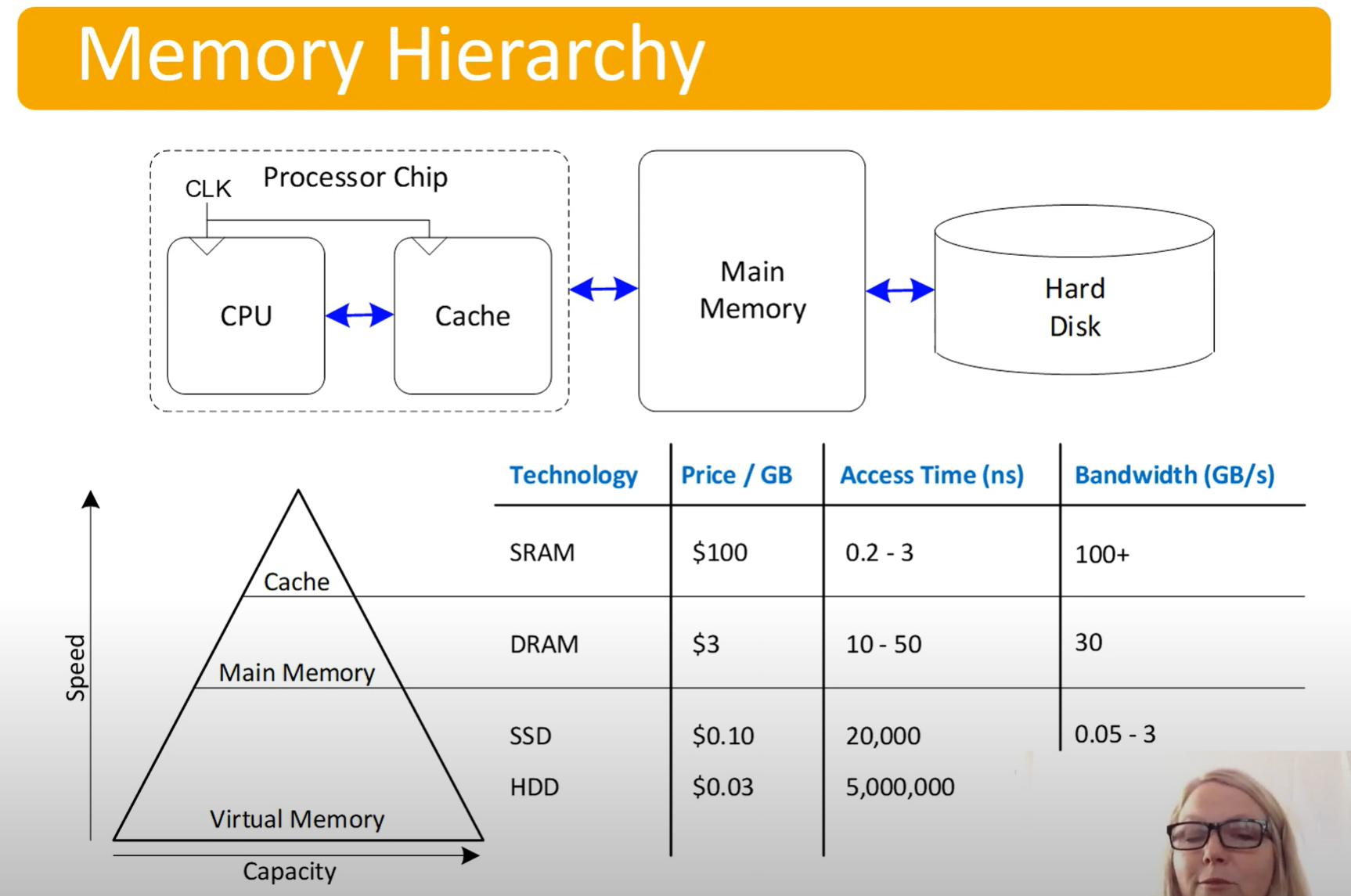
To make this fast, exploit two localities:
- Temporal locality
- If data used recently, likely to use it again soon
- Usage: keep recently accessed data in higher levels of memory hierarchy
- Spatial locality
- Locality in space, nearby data
- Usage: when access data, bring nearby data into higher levels of memory hierarchy
Part 2: Performance
Measure mem performance in:
- Hit - Data found in that level of memory hierarchy
- Miss - Data not found, must go to next level
- Both have rates associated with them (occurrences / accesses)
- Complementary: 1 = Hit Rate + Miss Rate
- AMAT = Average Memory Access Time
AMAT = (Hit time + (Miss rate * Miss penalty))
Amdahl’s Law - “The effort spent increasing the performance of a subsystem is wasted unless the subsystem affects a large percentage of overall performance”
- Performance gain from improvements is limited by the proportion of time the improved feature is used
Part 3: Cache Intro
The Cache
- Highest level of mem hierarchy
- Fast (typically a 1 cycle access)
- Ideally supplies the most data to the processor
- Usually holds most recently accessed data
What data is held?
- Ideally caches would anticipate needed data, but in lieu of seeing into the future:
- Leverage the locality principles, spatial and temporal
Cache Terminology:
- Capacity (C)
- Number of data bytes
- Block Size (b)
- Bytes of data brought into the cache at once
- Also known as the line size
- Number of blocks (B=C/b)
- Number of blocks in the cache
- Equal to the data stored divided by block size (line size), B=C/b
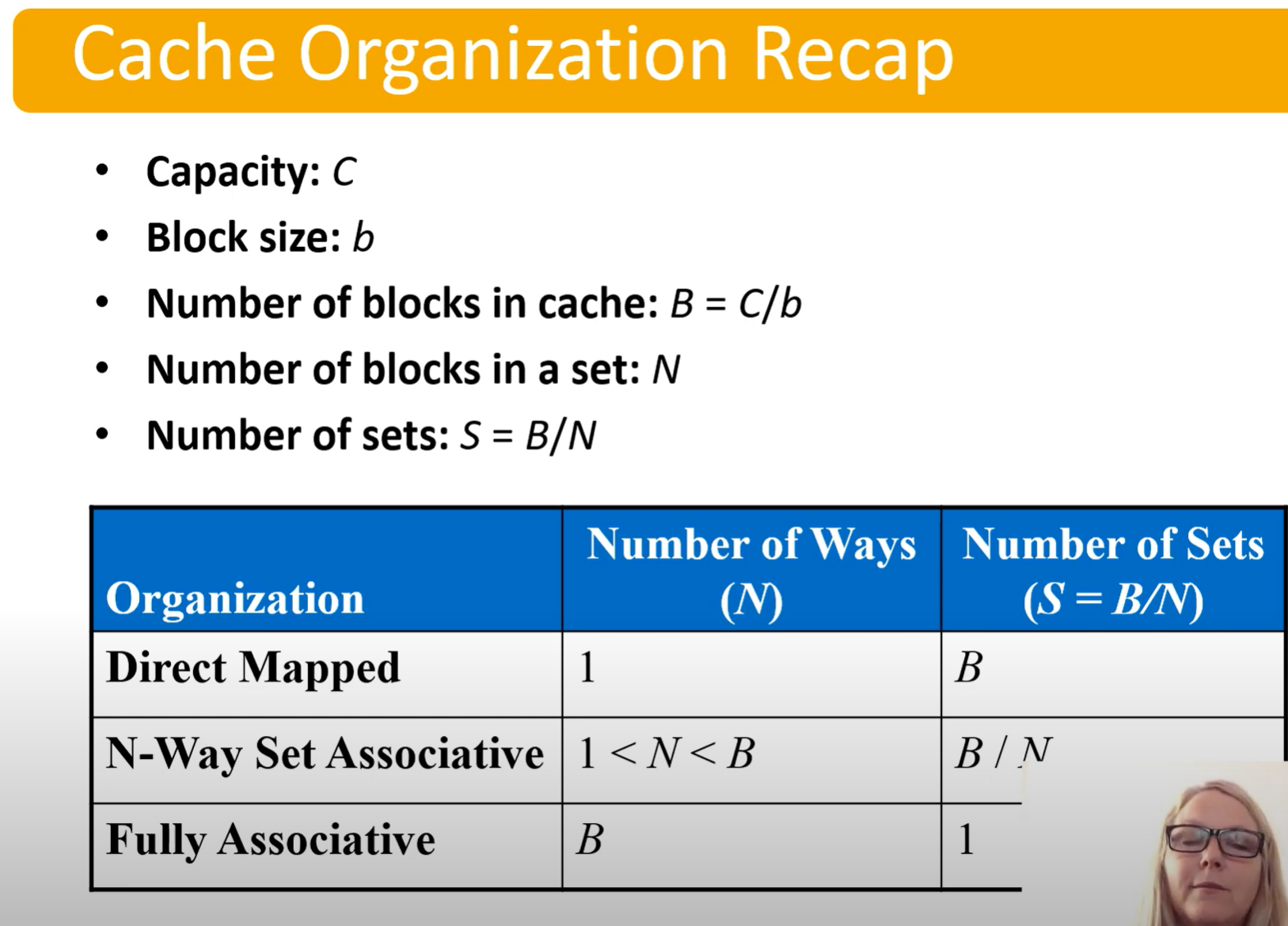
- Degree of associativity (N)
- Number of blocks in a set
- Number of sets (S=B/N)
- Each memory address maps to exactly one
location in a set?
- Each memory address maps to exactly one
How is data found:
- Cache data organized into sets
- Each mem address maps to exactly one set
- Caches categorized by # blocks in a set:
- Direct mapped: 1 block per set
- N-way set associative: N blocks per set
- Fully associative: all cache blocks in 1 set
Part 4: Direct Mapped Cache
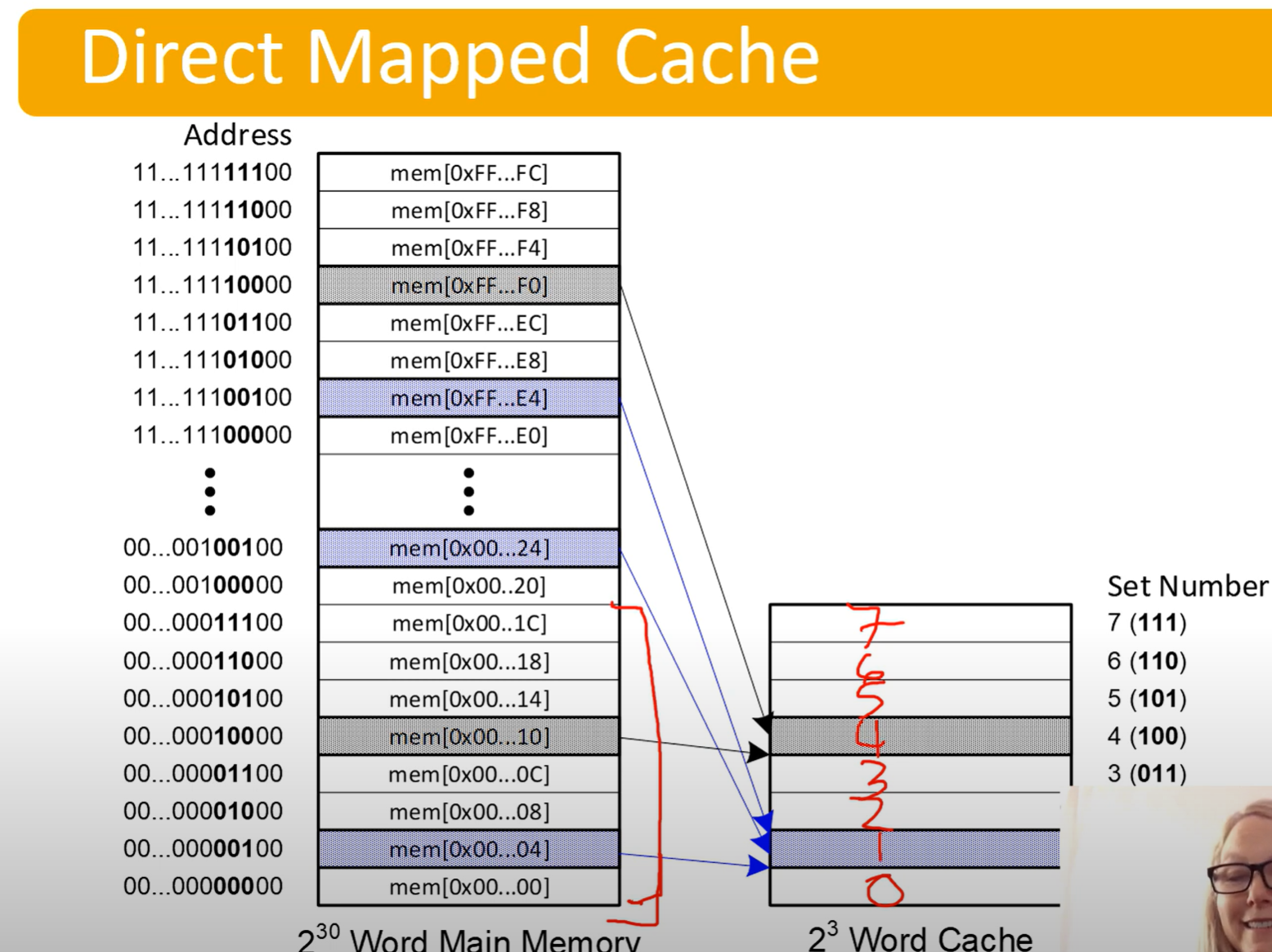
Multiple addresses in memory are mapped to the same location in the cache.
- Look at the highlighted memory address to see which word (word size here is 8 bit I think?) maps to which location in the cache.
- Last 2 digits are 0 because we’re only worried about the address of each word.
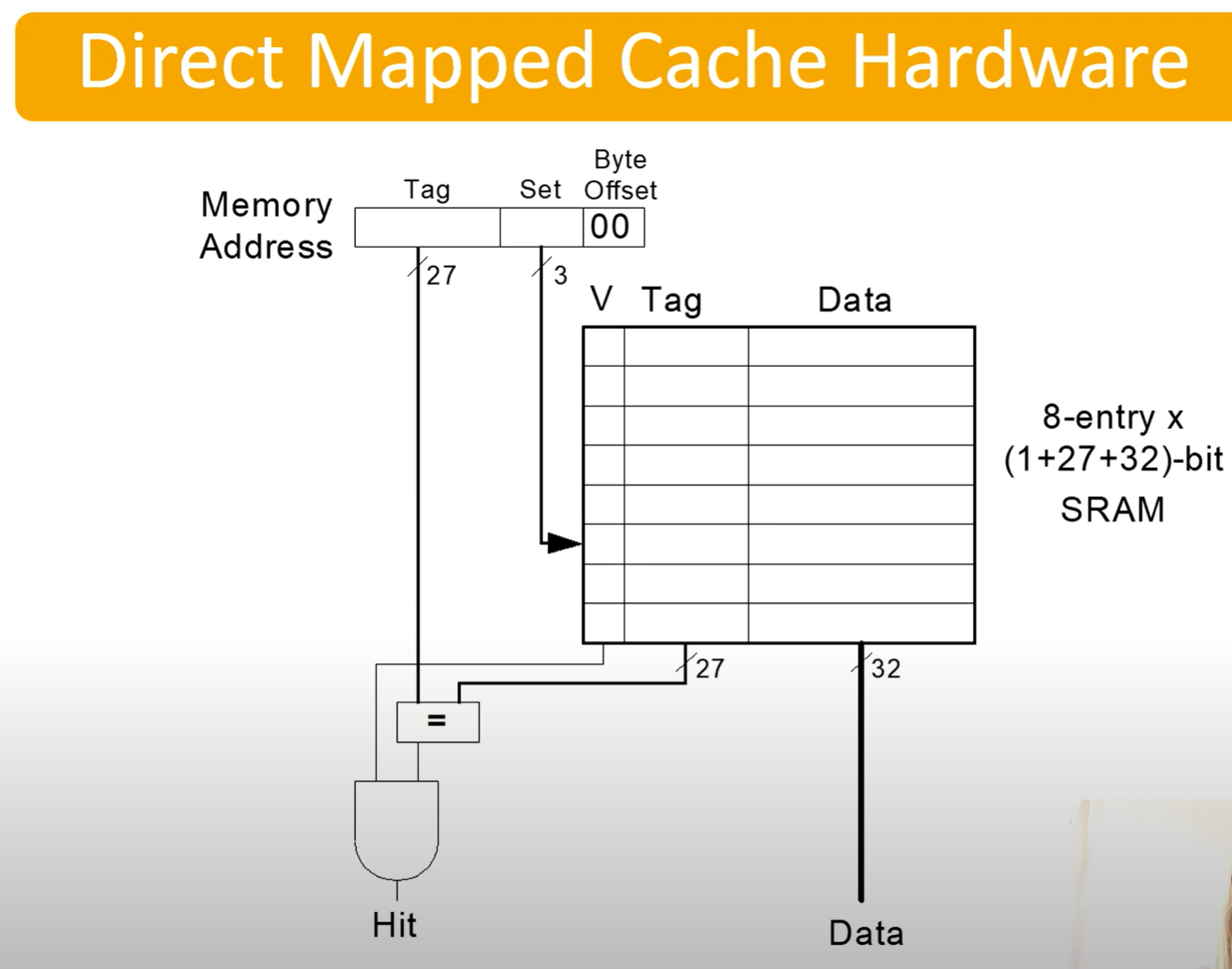
| Tag: 27 bits | Set: 3 bits | Byte Offset: 2 bits |
|---|
- This is following with the above example, an example of a memory address set
- Tag Bits - Identifies what address it actually is.
- Set Bits - 3 bits so we can access the 8 entries (
) in our cache - Offset Bits - Line size?
| V | Tag | Data |
|---|---|---|
| 1 | 000 | 0123456A |
| In our cache, we’ll have a table like this |
- V: Valid bit
- Tag: Stores the tag of the address actually is (seperates different addresses mapped to the same place)
- Data: The actual data
Example of loading data given in video
Part 5: Associative Caches
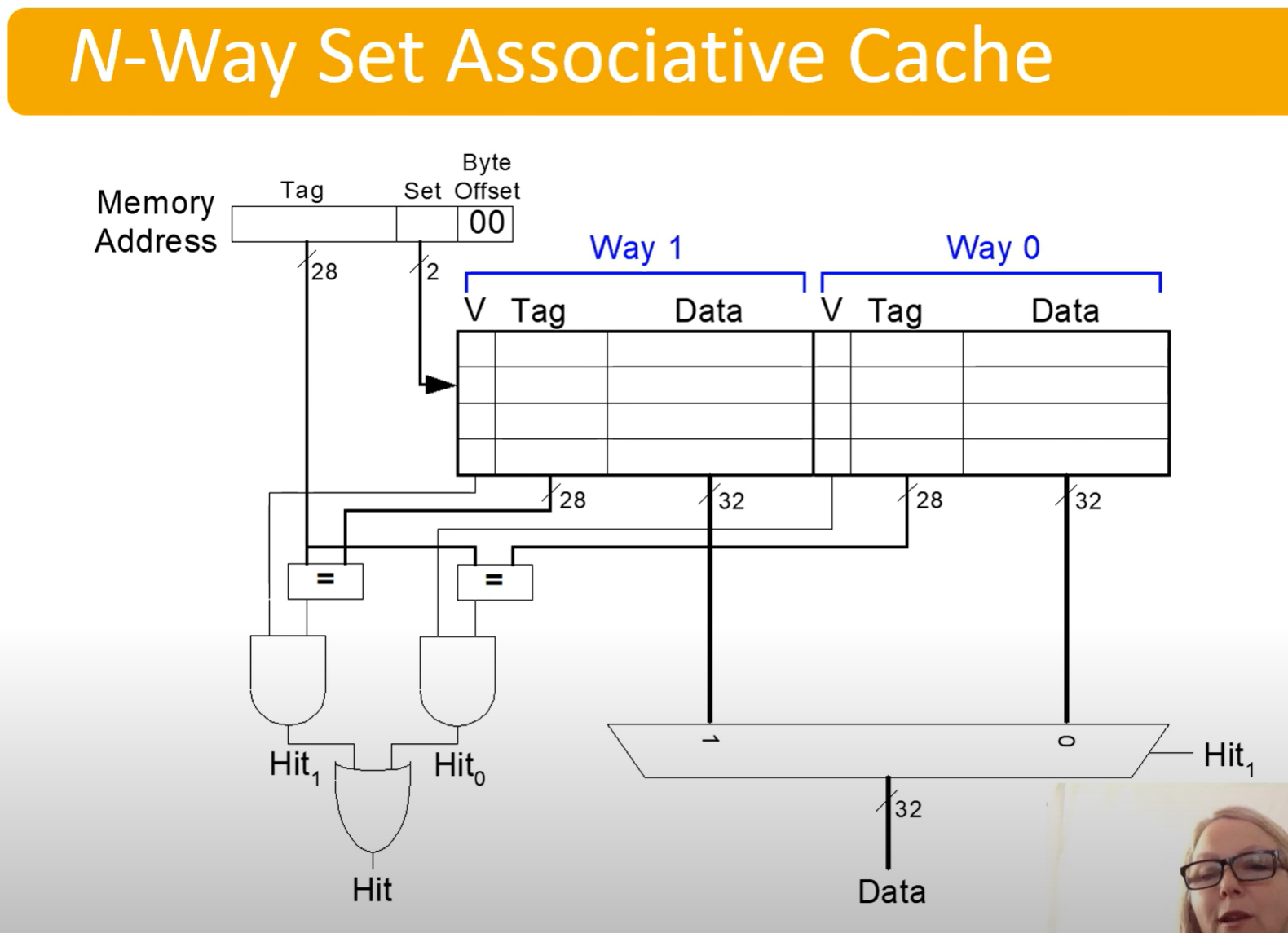
N-way Associative Cache, or just Associative Cache
| Tag: 28 bits | Set: 2 bits | Byte Offset: 2 bits |
|---|
- Tag serves the same purpose
- Set bits are still set index
- Offset serves the same purpose
We can see that it will check both data in parallel, then use the MUX to determine which data to extract on hit
Reduces conflict misses
However, expensive to build
| Cache Type | Pros | Cons |
|---|---|---|
| Direct-mapped | Simple and fast hardware design. | High conflict misses (since each block has only one place to go). |
| Low power consumption. | Poor cache utilization if many blocks map to the same line. | |
| Low cost (less hardware). | May degrade performance for certain memory access patterns. | |
| Set-associative | Reduced conflict misses compared to direct-mapped. | Slightly higher access time and complexity due to searching multiple slots. |
| Better cache utilization. | Higher power consumption and cost than direct-mapped. | |
| Offers a balance between performance and complexity. | Can still have some conflict misses, though fewer. | |
| Fully-associative | Completely eliminates conflict misses. | Highest access time and complexity (must search the entire cache). |
| Best cache utilization. | High power consumption and hardware cost. | |
| Best for small caches or critical data. | Not practical for large caches. |
- ChatGPT
Part 6: Spatial Locality
Increase block size, to allow nearby data to come in
- Block size, b=4 words
- C = 8 words
- Direct Mapped (1 block per set)
- Number of blocks, 2 (C/b, 8/4, => 2)
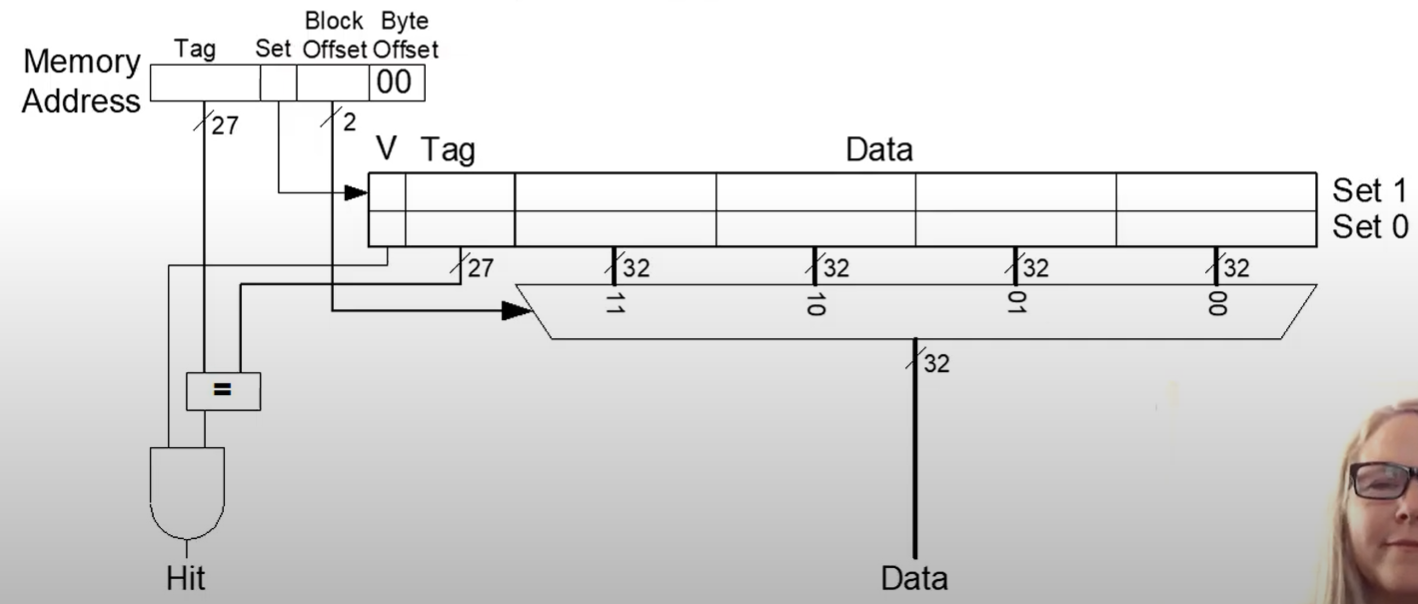
Now since our block size is bigger, we need a block offset bit to tell us which to extract
Whenever we pull in data, write to the whole block.
IE if we want XXXXX|1|11|00, we write in XXXXX|1|11|00 - XXXXX|1|00|00 as well, writing in four words. We do this to take advantage of spatial locality, assuming that nearby values will be used.
- Afterwards, even though we have only called memory for XXXXX|1|11|00, XXXXX|1|00|00 will be a hit
Larger block sizes reduce misses through spatial locality
Types of misses:
- Compulsory - First time data is accessed
- Capacity - Cache too small to hold all data of interest
- Conflict - Data of interest maps to same location in cache
Miss penalty - time it takes to retrieve a block from lower levels of hierarchy
Part 7: LRU
A replacement policy
- When cache is too small to hold all data of interest at once, some data will need to be replaced
- Need to store data X, expel old data Y
- Most frequent method of doing this is LRU - Least recently used replacement
Can track this by storing a U (Used) bit in the Tag table along with the V (valid) bit, tracking which entry is the least recently used
Part 8: Cache Summary
- What data is held in the cache?
- Recently used data (temporal locality)
- Nearby data (spatial locality)
- How is data found?
- Set is determined by address of data
- Word within block also determined by address
- In associative caches, data could be in one of several ways
- What data is replaced?
- LRU - Least-recently used way in the set
Miss Rate Trends:
- Bigger caches reduce capacity misses
- Greater associativity reduces conflict misses
Bigger == better (cache sizemiss rate)
Associative == good (more ways associativemiss rate)
Blocks are more complicated
- Bigger blocks reduce compulsory misses
- Bigger blocks increase conflict misses
This is highly related to the cache size though: - Small caches are more affected by block size leading to conflict misses
Multilevel caches
- Larger caches have lower miss rates, longer access times
- Expand memory hierarchy to multiple levels of caches
- Level 1: small and fast (e.g. 16 KB, 1 cycle)
- Level 2: larger and slower (e.g. 256 KB, 2-6 cycles)
- Most modern PCs have L1, L2, and | 2 cache
We have a small L1 cache so that we keep access time low.
Part 8: Virtual Memory
🧪 -> Refresh the Info
Did you generally find the overall content understandable or compelling or relevant or not, and why, or which aspects of the reading were most novel or challenging for you and which aspects were most familiar or straightforward?)
Did a specific aspect of the reading raise questions for you or relate to other ideas and findings you’ve encountered, or are there other related issues you wish had been covered?)
🔗 -> Links
Resources
- Put useful links here