Prep
Information Representation
Computer Structure
Assembly
I/O
- I/O devices have IDs associated
- Dependent on I/O port
Two main Types:
- Dependent on I/O port
- I/O mapped I/O
- Memory mapped I/O
IO Mapped
- I/O devices and memory have separate address spaces
- I/O: 0, 1, 2, …
- Mem: 0, 1, 2, …
- Intel
- Memory: mov
- I/O: in for reading and out for writing
Cons:
- Need more buses because we need I/O bus and a memory bus
Memory Mapped I/O
- I/O devices and memory share the same adress space but we just reserve some of the address for I/O
- Ex (index is address):
[IO, IO, IO, Mem, Mem, Mem, ...]
- Ex (index is address):
- If intel used it:
- Both use mov, just for different addresses
Advantages:
- Both use mov, just for different addresses
- Get to treat IO devices like memory. No more instructions. C/C++ can access IO
Disadvantages: - Inacessible memory addresses
Instructions
Wait Loop IO AKA Polling:
- Repeatedly ask if it has input
- Once it has input, do something
Pros: - Simple
- Low latency: Gets addressed (read) quickly
- Can all be done in software
Cons: - Wasteful of CPU time
- Most of the time, no input
Interrupt Driven IO
- Get interrupted, then address the interruption
1. Running some program P
2. I/O device generates an interrupt
3. Save program’s state: EIP, EFLAGS, Seg
4. Ask the I/O device for its interrupt id INTA
	a. Acknowledge interrupt
5. I/O device gives back its interrupt Id
6. Service the interrupt
7. Resume program P
	a. IRET
Pros:
- Don’t waste CPU time
Cons: - Each instruction take slightly longer
- Higher latency
- More complex system
- Additional hardware
Interrupt Descriptor Table
- OS maintains a table of Interrupt Vectors
- Each vector stores the address of the ISR as well as some other information
- Protection levels - Entries are indexed by the interrupt ID of the devices
- Inside of the intel CPU there is another register called IDT that stores the beginning of the address of the interrupt descriptor table in memory
- OS filled in both the table as well as the register at boot time
Where is interrupt handled
- Interrupts checked for at the end of every instruction
- CPU Cycle: Fetch, decode, execute, write, check for interrupt, handle interrupt if there is one
Prioritizing interrupts
- Always serve the highest interrupt if multiple at same time
- During an interrupt could be another
- Always handle the new interrupt first
- Ignore interrupts until the current interrupt is finished
- Service the new interrupt but only if it has higher priority
OS
OS is a Program
- OS is a program
- OS is only special because it is the first program run
- For example, if there is a single CPU with a single core, you can’t run your own program and the OS at the same time
- Switch between programs with a system call
- Hardware can interrupt the program that is running
OS Handles:
- Managing the file system
- Manages memory
- Manages processes
- Manage I/O
Application Loading
-
Type ./a.out on the terminal -
Terminal will execute
execve("a.out")to tell the OS to start runninga.out -
Locate
a.outon the hard drive -
Read
a.out’s header. This has info abouta.outsuch as its size, where the text section is at, where the data section is at, where is_start, etc. -
Locate a free section of memory large enough to hold
a.outand copy it there- OS does all of the memory management so it knows which locations are free and which are in use. It “knows” this because it keeps track of memory tables that show which sections are in use and which are free
-
Save the operating system’s state (registers, permissions, etc)
-
Wipe the registers clean and set esp to the beginning of the program’s stack
-
jmptoa.out’s start -
a.outis now running
Booting the OS
- Bootloader is stored in ROM (read only memory) and ROM is nonvolatile. Resolves the chicken and egg problem.
- Intel when it turns on, EIP is set
0XFFFFFFF0, so this is where we place the bootloader - Bootloader reads the first sector of th disk and copies it into memory
- The OS saved itself to this first sector
- Jump to the location in memory we copied the first sector to and execute the instructions that are now there
- The OS then loads the rest of itself from the hard drive into memory
Time Sharing
- Time sharing is multiple processes taking turns so quickly that it appears that they are running simultaneously
- In time sharing processes are given a time slice aka a quantum to run
- There is a timer that goes off every X seconds. This timer goes off more frequently than a time slice. We might want the time slice to be Y seconds. So when the timer goes off goes
timer_count++, then whentimer_count==Y/Xthen switch to the next proces - Process is an instance of a program
Implementation
- Process X was currently running and its time is now over and we want to switch to Process Y
- Save X’s state in X’s entry in the OS’s process table
- Registers: all of them
- EIP, EFLAGS, and CS are on the stack at the moment. They are there because we got to this context switch handler via an interrupt and the interrup hardware in the CPU saces those values to the stack
- Load Y’s state from Y’s entry in the OS process table
- State == registers
- Also have to make sure Y’s EIP, EFLAGS, and CS are placed back on the stack
- Start Y
- Setting EIP back to the instruction that Y was on
- This is done via aniret
Run State vs Sleep State
- When a process is ready to be run it is run state
- When a process is not ready to be run it is in sleep state
- Generally a process enters sleep state when it is asking hte OS to do something on its behalf
- Get input, open a file, etc.
- Generally a process enters sleep state when it is asking hte OS to do something on its behalf
PraerieLearn
Interrupts:
- OS - IDT filled out
- OS - IDTR pointer to the beginning of the IDT
- Hardware - IO device asserts the interrupt line
- Hardware - CPU asserts the interrupt acknowledge line
- Hardware - IO device sends its interrup id back to the CPU
- Hardware - CPU saves flag register, PC, and the CS registers
- Hardware - CPU jumps to the appropriate interrupt handler
- OS - Interrupt actually serviced
CS Registers - Code Segments
- Base address of the segment where the executable code resides in memory
- Works with other registers like the IP
ISR - Interrup Service Routing
- Before using, save all registers (but ESP which you can use)
OS:
Program Running - EIP pointing to memroy belonging to your program
Program order:
./a.outtyped in shell- shell executes
execve - OS locates
a.outin the file system - OS reads
a.out’s header - OS searches memory allocations and tables for a space big enough. Copies a.out there. Updates its memory allocation tables and process tables.
- OS saves its state
- OS jumps to
a.out’s_start
If the OS is the program that loads other programs, how does the OS get loaded? How do we avoid the chicken and egg problem?
Make sure you reply to both questions explicitly. Consider using bullet points in your answer so that we know which parts of your answer correspond to which question.
- The bootloader is loaded in from ROM (read access memory). This is non volatile memory. The bootloader reads the first sector of the disk and copies it into memory, this sector holds to the OS. We execute the instructions now in memory, and from here the OS executes.
- This avoids the chicken and egg problem by having a non volatile process (the bootloader in ROM) explicitly designed to load the OS, and allow it from there to spawn new programs.
Timesharing depends on the following hardware components - the timer and interrupt
Chris Review
Integer Representation
Know:
-
Unsigned
-
Sign Magnitude (Same as unsigned with sign bit)
-
2s complement (The complicated negative one)
- Conversion:
- If positive, treat as unsigned. If negative, continue
- Flip all the bits and add one
- The number represented is the 2s complement negative representation
- Conversion:
-
Change of bases:
- Easiest way is to convert to ten as an intermediate step, then convert to the desired base
- Easiest way is to convert to ten as an intermediate step, then convert to the desired base
-
Hexadecimal
- Base 16, starts with
0x - Each number represents four bits
- Base 16, starts with
Floating Rep
- 1 bit for sign, 8 for exp, 23 for mantissa
1|10100100|10010010001011011010111- Implicit one in the mantissa
- The exponent has a bias of 127
- Essentially take away the leading bit, add one and that’s your exponent if positive
Array Representation
accessing: arr[a][b][c] with size (i,j,k)
Two Major Types, And in those types you have row/column major:
- One big chunk
- Row:
size = sizeof(pointer) + a(j+k) + b(k) + k - Column:
size = sizeof(pointer) + c(k+j) + b(j) + i *(arr + a(j+k) + b(k) + k)
- Row:
- Array of arrays
- Pointers to nested arrays:
*(*(*arr+a)+b)+c)
- Pointers to nested arrays:
Debugging
Assembly
In the x86 Assembly language, we have 6 general-purpose registers (EAX, EBX, ECX, EDX, ESI, EDI). We also have registers such as ESP (points to the top of the stack), EBP (bottom of a stack frame for a given function), and EIP (stores the instruction)
Assembly Boilerplate
.global _start

.equ ws, 4

# Locals
.data
	a: .long 0
	b: .long 0
	c: .long 0

.text
_start:


done:
	nop // newline after nop
Multidimensional Array Access:
movl arr, %edx

movl i, %ecx
movl (%edx, %ecx, 4), %edx # Accessing arr[i]

movl j, %ecx
movl (%edx, %ecx, 4), %edx # Accessing arr[i][j]

movl k, %ecx
movl (%edx, %ecx, 4), %edx # Accessing arr[i][j][k], final value stored in edx
Debugging
Compiling:
as --gstabs --32 -o hello.o hello.s
ld -melf_i386 -o hello.out hello.o
Printing:
p $eax # Registers have dolla
p (int)num # Need to cast labels

p ((int*)$eax)[0] # Need to cast eax value to int pointer, [0] dereferences the first element
p ((int*)$eax)[0]@10 # Starts at 0, prints 10 elements
C Callable Functions in Assembly
Function Calling
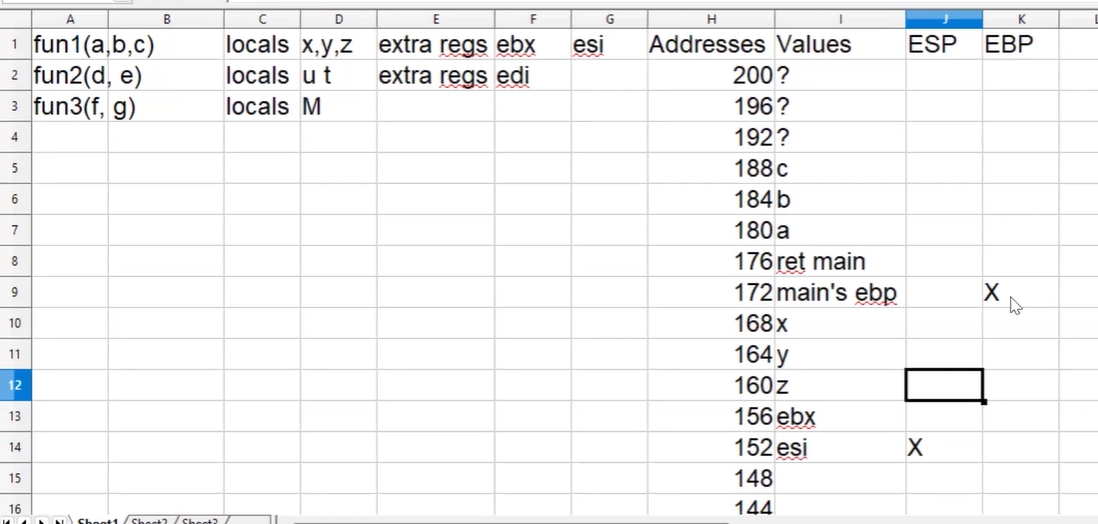
The caller will push args to the stack in reverse order (so the first arg is on top, f(a,b,c) => push c, b, a)
- It also pushes a return label/address to continue execution from
The callee then deals with the EBP, ESP, and maintaining registers
Prologue
Establish the stack frame for the current function
EBP holds the pointer to the start of the stack frame
Stack frame is everything between EBP and ESP
The stack frame gives you a fixed location for accessing locals and arguments
ESP keeps changing throughout the runtime of your function so it makes really hard to keep accessing locals and args through it because it keeps changingpush %ebp movl %esp, %ebp subl $num_locals * ws, %esp Push those registersEBP Offsets for args:
Positive offsets are function arguments
Negative offsets are local variablesAfter the prologue of fun1(a,b,c)
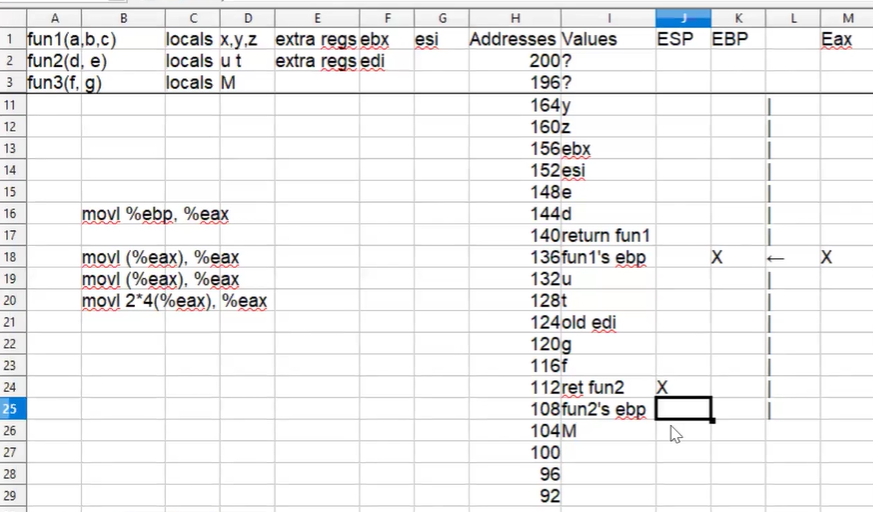
Can move up to a future by following the ebp pointers of call stack
movl %ebp, %eax // ebp into eax
movl (%eax), %eax // following the ebp pointer (fun3->fun2)
movl (%eax), %eax // following the ebp pointer (fun2->fun1)
movl 2*ws(%eax), %eax // accessing the 1st fun1 arg, a
Epilogue
Undoes the prologue
Restore saved registers
Remove the locals
Restore the old stack framePop the saved registers off the stack or move them off the stack movl %ebp, %esp pop %ebpAfter the epilogue of fun3(f,g)
Link to original
Using this, you can even call assembly functions by pushing args to stack, and using the return value in EAX
Inline Assembly
Boilerplate
__asm__(
/* Code */ :
/* Outputs */ :
/* Inputs */ :
/* Clobber */
);
Syntax explained in cheat sheet, have different types of outputs and places to store it:
- Writeable, early write, bijective
- Specific register, memory, general register, compilers choice